External DVD drive with extra connections
External DVD drive with extra connections


No internal drive? This is the solution
Many laptops today no longer have a built-in DVD drive. However, you may still want to play or burn CDs or DVDs, or open files. With this external solution, you simply connect the device and get started right away.
All-in-one for your laptop or PC
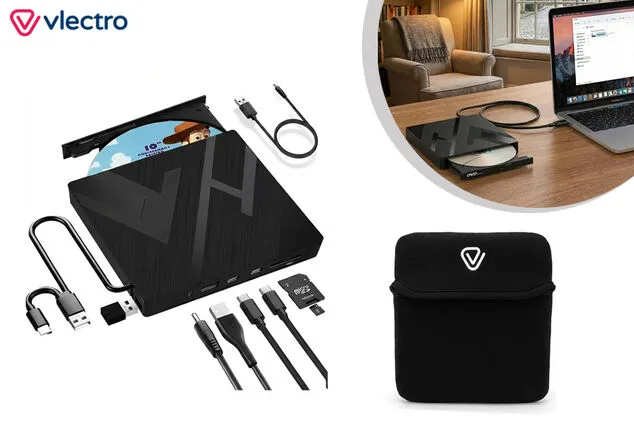
This 7-in-1 external DVD drive does more than just read discs. You can also use it as a hub with extra ports for USB devices and memory cards. Thanks to the combination of USB-A and USB-C, you can connect it to both older and newer devices. There is no need to install anything, as the system works via plug & play.
In addition, the device supports various formats and media, ensuring you remain flexible in your usage. Connect it directly to your computer for stable operation and use the extra power port if necessary.
The compact design and the included storage pouch make it convenient to take with you. Ideal for home, the office, or on the go.
Order today and start using your CDs and DVDs again.
Specifications
- Connections: 2x USB-A, 2x USB-C, SD card slot, TF card slot
- Supported media: CD-ROM, CD-R, CD-RW, DVD-ROM, DVD-R, DVD-RW, DVD+RW, DVD+R, DVD+R DL, DVD-R DL, DVD-RAM
- Supported formats: DVD-ROM, DVD-Video, CD-R/RW, CD-ROM/XA, CD-Extra, CD-Text
- Compatibility: Windows XP / 2003 / Vista / 7 / 8.1 / 10 / 11, Linux, macOS
- Power supply: via USB, optional via DC port
- Maximum disc capacity: 8.5 GB
- Dimensions: 15 x 15.5 x 2 cm
- Weight: 350 grams
- Extra: includes storage pouch
- Limitation: no Blu-ray support
Shipping
- Delivery time: 5 working days
- You will get an email with tracking code as soon as your order is on its way.
- Follow your parcel, view your orders, return or report a faulty item via My orders
- 30-day returns for just £ 1.70
- Any questions? Visit Help
- 2 year guarantee applies through Outspot.
Click here for the manual.
Frequently asked questions about the external DVD reader
1. How does an external DVD reader work?
An external DVD reader connects to your computer via a USB-A or USB-C cable. As soon as you plug it in, it is automatically recognised, allowing you to read or burn CDs and DVDs immediately. You do not need to install any additional software, making it very easy to use.
2. Is this DVD reader compatible with my laptop or PC?
Yes, this device works with various operating systems, including Windows, Linux, and macOS. Thanks to the dual connection with USB-A and USB-C, it is suitable for both older and newer devices.
3. Can I also burn DVDs with this device?
Yes, this external reader supports both reading and burning CDs and DVDs. It works with various formats such as DVD-R, DVD+R, and CD-RW, providing you with great flexibility.
4. Does this DVD reader support Blu-ray discs?
No, this device does not support Blu-ray. It is specifically designed for CD and DVD formats.
5. Do I need extra software to play DVDs?
In most cases, no. However, please note that some recent versions of Windows do not include standard DVD playback software. In that case, you can install a third-party media player to play your discs.
6. Can I connect other devices via this DVD reader?
Yes, the device functions as a hub with additional USB-A and USB-C ports, and it also features slots for SD and TF cards. This allows you to connect multiple devices simultaneously.
7. Why is my DVD reader sometimes not recognised?
This can happen if you connect it via a USB hub or if your computer provides insufficient power. Connect it directly to your computer and, if necessary, use the additional power port for more stable operation.
Campaign number: 21492
External DVD drive with extra connections
- Reads and burns CD/DVD
- 7-in-1 multifunctional design
- Plug & play use
- USB-A and USB-C connection
- Compatible with multiple systems
- Compact and portable
- Delivery time: 5 working days
No internal drive? This is the solution
Many laptops today no longer have a built-in DVD drive. However, you may still want to play or burn CDs or DVDs, or open files. With this external solution, you simply connect the device and get started right away.
All-in-one for your laptop or PC
This 7-in-1 external DVD drive does more than just read discs. You can also use it as a hub with extra ports for USB devices and memory cards. Thanks to the combination of USB-A and USB-C, you can connect it to both older and newer devices. There is no need to install anything, as the system works via plug & play.
In addition, the device supports various formats and media, ensuring you remain flexible in your usage. Connect it directly to your computer for stable operation and use the extra power port if necessary.
The compact design and the included storage pouch make it convenient to take with you. Ideal for home, the office, or on the go.
Order today and start using your CDs and DVDs again.
Specifications
- Connections: 2x USB-A, 2x USB-C, SD card slot, TF card slot
- Supported media: CD-ROM, CD-R, CD-RW, DVD-ROM, DVD-R, DVD-RW, DVD+RW, DVD+R, DVD+R DL, DVD-R DL, DVD-RAM
- Supported formats: DVD-ROM, DVD-Video, CD-R/RW, CD-ROM/XA, CD-Extra, CD-Text
- Compatibility: Windows XP / 2003 / Vista / 7 / 8.1 / 10 / 11, Linux, macOS
- Power supply: via USB, optional via DC port
- Maximum disc capacity: 8.5 GB
- Dimensions: 15 x 15.5 x 2 cm
- Weight: 350 grams
- Extra: includes storage pouch
- Limitation: no Blu-ray support
Shipping
- Delivery time: 5 working days
- You will get an email with tracking code as soon as your order is on its way.
- Follow your parcel, view your orders, return or report a faulty item via My orders
- 30-day returns for just £ 1.70
- Any questions? Visit Help
- 2 year guarantee applies through Outspot.
Click here for the manual.
Frequently asked questions about the external DVD reader
1. How does an external DVD reader work?
An external DVD reader connects to your computer via a USB-A or USB-C cable. As soon as you plug it in, it is automatically recognised, allowing you to read or burn CDs and DVDs immediately. You do not need to install any additional software, making it very easy to use.
2. Is this DVD reader compatible with my laptop or PC?
Yes, this device works with various operating systems, including Windows, Linux, and macOS. Thanks to the dual connection with USB-A and USB-C, it is suitable for both older and newer devices.
3. Can I also burn DVDs with this device?
Yes, this external reader supports both reading and burning CDs and DVDs. It works with various formats such as DVD-R, DVD+R, and CD-RW, providing you with great flexibility.
4. Does this DVD reader support Blu-ray discs?
No, this device does not support Blu-ray. It is specifically designed for CD and DVD formats.
5. Do I need extra software to play DVDs?
In most cases, no. However, please note that some recent versions of Windows do not include standard DVD playback software. In that case, you can install a third-party media player to play your discs.
6. Can I connect other devices via this DVD reader?
Yes, the device functions as a hub with additional USB-A and USB-C ports, and it also features slots for SD and TF cards. This allows you to connect multiple devices simultaneously.
7. Why is my DVD reader sometimes not recognised?
This can happen if you connect it via a USB hub or if your computer provides insufficient power. Connect it directly to your computer and, if necessary, use the additional power port for more stable operation.
Campaign number: 21492